


A little trip down memory lane
Think back to the not-so-distant past, when you could open a website without reading a wall of text about cookies, storage and processing purposes, and then making an important decision on a screen like this one:

It really wasn’t that long ago. The whole circus kicked off in 2018, when the GDPR took effect. It introduced the roles of data controller and data processor, and it put a long list of obligations on service providers, including the right to have your personal data deleted. The big players didn’t get a free pass either, and Google had no interest in collecting fines, so it had to move.
Enter Consent Mode
One thing you have to understand up front: when Google built Consent Mode, it wasn’t primarily thinking about its customers or its advertisers. It needed to stay out of trouble, and that’s why the thing works the way it works.
Nobody, ever, promised that rolling out Consent Mode makes you GDPR compliant.
So no, implementing Consent Mode does not guarantee that your website or mobile app complies with the GDPR. Getting the details right takes a privacy lawyer. We can’t give legal advice and we don’t want to, so please read everything below with that in mind.
What is Consent Mode?
The idea behind Consent Mode is that Google tags fire according to the consent the visitor actually gave. Tags support several consent types:
- analytics_storage
- ad_storage
- ad_personalization
- ad_user_data
There are a few more beyond these, but they don’t affect how Google tags behave. We call these consent signals flags. Each flag has its own job, and if you want to go deeper, Google’s documentation on consent types is worth a read.
The short version: if you want the visitor to show up in Google Analytics, you need analytics_storage. If you want to use that visitor for advertising that actually performs, you need the ad_ flags accepted too.
When do you actually need this?
Pretty much always. If you advertise on Google, it’s non-negotiable. Even if all you run is Analytics, you still want it. And this applies to your mobile app just as much as your website. Your app needs a consent screen and a proper Consent Mode implementation, exactly like the web does.
Skip Consent Mode and Google will make your life harder in a lot of small ways: remarketing becomes impossible, campaign performance drops, and you end up watching your competitors pull ahead.
Google is quite happy to reach for that stick when consent isn’t implemented properly on your site or in your app. Sure, there are loopholes, like simply telling Google that the visitor granted full consent. But take our word for it:
It’s just not worth it.
Once Google penalizes you, getting good results out of the platform again is genuinely hard. When a site lands in an enforcement cycle, you have to fix the setup and then appeal through a form. That triggers another review, except now every little mistake gets picked apart, and it stays that way. Those post-appeal reviews aren’t fast either. For a larger company, one of these episodes can easily cost tens of thousands of euros.
Consent Mode isn’t Google’s only requirement for advertising, by the way. There’s a checklist that spells out exactly what boxes you need to tick before Google considers your site or app compliant.
We’ve seen a case where Consent Mode worked flawlessly on a website, but Google noticed the site had no link to its privacy page and penalized our client with worse performance anyway. So take the holistic view: get the consent banner right, make sure Consent Mode respects the visitor’s actual preferences, and work through Google’s checklist.
Advanced vs. basic implementation
Deciding to implement Consent Mode is just the start. The safest approach from a legal standpoint is to send Google nothing at all until the visitor makes a choice. That’s the basic implementation. It’s probably the most defensible option legally, but it’s the weakest one for data. You’ll know nothing about your visitors until they grant „adequate” consent.
The advanced implementation, on the other hand, sends data to Google both before consent is given and when it’s denied. That data takes the form of cookieless pings. They contain no personal data, but they help the system model conversions from visitors who declined.
Compare the two and modeling is the main difference. With basic mode, the only conversions you’ll see in your reports are the ones that were actually measured. With advanced mode, Google tries to model certain metrics for the visitors who said no. That’s a genuinely useful feature, because when modeling kicks in, the platforms tend to make pretty accurate guesses.
Keep in mind, though, that this is modeled data, not measured data. It is not an exact number, no matter how confidently Analytics or Ads presents it. And modeling needs volume to work. Realistically, only mid-sized businesses and up generate enough declined consents to meet the thresholds. Below that, advanced Consent Mode adds nothing to your Analytics reporting.
If you work with raw data, though, and export your Analytics data to BigQuery, advanced Consent Mode can be a real win. Those exports include the visitors who declined analytics_storage, anonymized behind pseudo IDs.
The consent banner
Which cookie tool should you pick?
Once you’ve settled on an implementation mode, you need a consent tool, a CMP, for the visitor to give consent through. You’d think this part is easy. It isn’t. Look for a Google Certified CMP, essentially off-the-shelf consent tools that support Consent Mode.
We’re not here to sell you on any particular one. What matters is that the tool shouldn’t block things automatically. You want to build the blocking logic manually. Here’s why: your legal team might be fine with a particular setup, and automatic blocking can make that setup impossible. Manual configuration gives you far more room to move.
The tool also needs to be properly customizable. The technical details matter enormously, but your acceptance rate only goes up when the banner looks right, meaning a high share of visitors grant full consent.
Consent banner design
Design, or rather layout, is a big deal. You can do everything right, roll out Consent Mode, tick every box on Google’s checklist, and then strangle the whole thing with a banner that converts terribly. That’s an own goal. You’ll be beautifully compliant and your ad platforms will have no data.
Three things matter in a consent layout:
- The visitor should give consent on the landing page
- The banner should cover as much of the page as possible
- Guide the visitor toward the choice that works best for you
Let’s take these one at a time.
Consent on the landing page
Getting consent on the landing page is critical. Why? Because if it happens later, the campaign parameters can be gone by then, and the visitor ends up in your analytics as direct traffic.
Picture this. A visitor arrives with XYZ UTM parameters. There’s a tiny consent banner on the landing page, they ignore it, but they like your product and start moving through checkout. On that first page the UTM parameters were still in the URL. On the next page they’re gone. If the visitor accepts consent there, it doesn’t matter how far down the funnel they go, they’re a direct visitor now, because there were no campaign parameters in the URL at the moment consent was granted.
You can pass campaign parameters through internal links alongside Consent Mode, which works around the problem of visitors consenting somewhere other than the landing page. But it breaks plenty of sites, so test it seriously before rolling it out. And these days navigation doesn’t happen through links alone, while this workaround only covers links.
The full-screen consent banner
The consent banners that convert are the ones that cover the entire page on arrival and force the visitor to choose. From a UX standpoint that sounds obnoxious, but it’s the best practice, and the reason is the point above: you want complete data in your analytics from the very first touchpoint.
A lot of people balk at a full-screen consent banner, but at this point it’s so common that visitors click the friendliest-looking button on reflex. Sure, there are sites where it’s hard to pull off, but aim for it.
Guiding the visitor toward the right choice
Now we’re in CRO territory. The goal is to get the visitor to grant the highest level of consent. Pre-selected consent levels are one way, assuming your legal team allows it. You can give the accept-all button a distinct color and shape, or even drop an emoji on the button that leads to the outcome you want. The sky’s the limit. Heatmap analysis and A/B tests are fair game too when you’re dialing in the perfect layout.
Take a look at this consent banner, for example:

Just about everything that can be wrong here is wrong:
- A white consent bar on a white page, covering essentially nothing
- The copy doesn’t meet Google’s checklist
- The toggles default to off, so hitting save grants nothing at all, exactly like ignoring the banner or clicking „Reject all”. Two of the three buttons leave you with no consent
- The accept-all button sits in the middle instead of at the top
- The buttons are too close together. Even a visitor who wants to give consent can miss and end up giving none
For comparison, here’s another consent dialog:
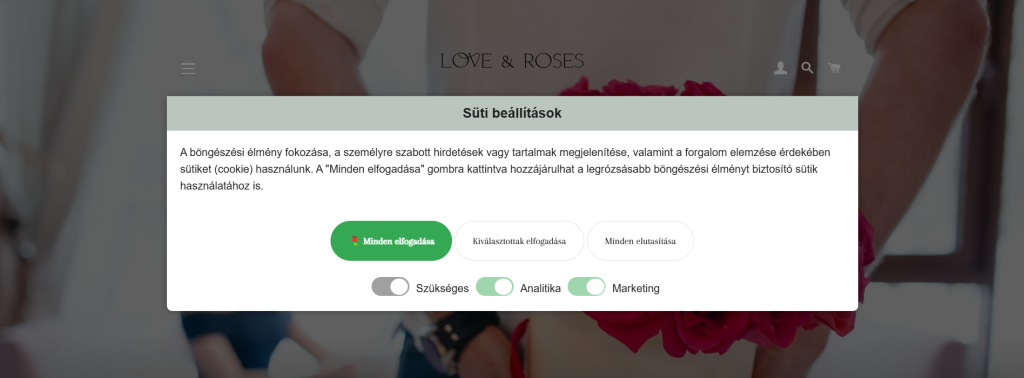
It’s pretty obvious what behavior we’re steering the user toward here.
We measured a 16% acceptance rate on the first consent tool and over 94% on the second. That’s an enormous gap, and we got there while still giving users a real option to decline.
Every other ad platform
We don’t want to leave you thinking Google is the only platform that needs consent to function. Every ad platform’s tracking code should fire, or not fire, according to the consent you did or didn’t receive. We focused on Google’s Consent Mode here because it’s the largest ecosystem, and because Google Analytics and Google Ads are more or less unavoidable.
That said, plenty of other ad platforms have their own consent handling. We usually run the rest the way we’d run basic Consent Mode: if the visitor consents, the tag fires, and if not, it doesn’t. The Meta pixel, for example, typically runs on marketing consent. But again, the exact behavior should follow what your legal team asks for. Bing Ads is worth a mention too, since it needs a Consent Mode setup similar to Google’s to work properly.
Turn the cookie problem into money
Ignoring consent and measuring everything without permission can land you in legal trouble. The GDPR is not optional, and mishandling visitor or customer data can cost you up to 2% of your corporate group’s revenue in fines. For a larger international company that’s several million euros, so it isn’t worth the gamble. Especially since, as we’ve seen, a good implementation means you barely have to give up any data.
And the rest of the world is catching up fast. The UK GDPR, Switzerland’s revised FADP, Canada’s PIPEDA, Australia’s Privacy Act and the growing pile of US state privacy laws all push in the same direction. If you sell across borders, the strictest regime in your footprint is the one you should be building for.
Exactly how much data you’ll give up, call it the cost of doing business legally, depends on where you’re starting from. If your site or app doesn’t account for consent at all today, expect less data after you implement it. The good news is that there are ways to make that drop as painless as possible.
If you already account for consent, the work is about finding the pieces that can be improved, meaning more visitors granting full consent. One thing is certain: the more data your ad platforms get, the better they perform, and they’ll pay you back in revenue.
The big drawback of off-the-shelf CMPs is the subscription model, and the prices sting. We built our own, which we can deploy on your site for a one-time fee, so there’s no recurring cost. It’s 100% Consent Mode compatible with a full-screen design, fully responsive so it looks right on mobile too. Another advantage over off-the-shelf tools: it loads no external scripts. All the code lives in the page source, so it loads instantly, which is a nice win for SEO as well. If our CMP sounds interesting, get in touch for a quote.