


For a very long time, offline conversion tracking was a playground for the biggest companies only. Thanks to the AI era, it’s now within reach for smaller businesses too.
What is it, and why should you care?
Offline conversion tracking is when you send data from an event that didn’t happen online to your ad platforms. You can optimize campaigns toward those conversions exactly the way you would toward online ones.
Lead gen sites are the obvious use case, but we also know an agricultural supplies store that badly needed accurate tracking of conversions happening over the phone. Sites like these typically have a contact form, maybe a phone number, and possibly a clickable email address. What can you actually measure there with online conversion tracking alone? Form submissions, phone number clicks and email clicks. And those are thin gruel as conversions go:
- Sure, somebody filled in the form, but the submission might be completely irrelevant and never turn into anything;
- There’s no guarantee that someone who taps a phone number actually places the call. In fact most people don’t tap the number at all, they punch it into their phone by hand. We measured it. And even when the tapper does call, there’s no guarantee anything relevant to your business happens on that call;
- Email clicks are an even bigger lottery. That only works if the user wants to fire off an email from their default mail client right then and there, which isn’t exactly how people behave.
Measuring the conversions that come through these channels is fundamental if you want the ad platform optimizing toward real outcomes. In our view, clicks of any kind are micro conversions at best. A form submission at least signals some intent, but let’s be honest, it’s still not the real thing.
So how do you do conversion tracking properly on a site where these are the channels you’d want to build your campaign optimization around? Offline conversions.
How it works under the hood
Offline conversions always have an online prequel. Say the visitor who closed a deal originally landed on your site from a Google Ads campaign. To send an offline conversion, you reference the click ID (gclid) captured when they landed. That’s what lets Ads attribute the later offline conversion to the right campaign. There are three ways to get an offline conversion into Google Ads:
- Enhanced conversions for leads. You send Ads the hashed personal data of whoever filled in the form (email address, phone number) along with the gclid recorded by the conversion linker. Google stores which hashes go with which gclid. So when it later receives, say, a hashed email address, it can look up the matching gclid and pull the conversion into the right campaign;
- You store the gclid yourself, and when you send the offline conversion you pass that stored gclid along, which is how Ads knows which campaign gets the credit;
- Combine the two: send user data on form submission and store the gclid as well, then send both when the offline conversion happens. Google says this is worth a median 10% lift in match rate.
Offline conversions work a little differently on Meta, TikTok, LinkedIn and the rest. The principle is the same though: an offline conversion needs an online prequel. That means capturing click IDs, cookie values and similar identifiers from the visitor’s device, so you can reference them when you send the offline conversion later.
How do you actually measure offline conversions?
This used to take serious development work. Your developers had to store all sorts of IDs, cookie values and consent levels in an internal database. It’s much easier now, because off-the-shelf solutions exist. We built one ourselves, and that’s what we’ll walk through here. Meet Phonevert.
Phonevert integrates with any website regardless of the platform it runs on. Tracking phone numbers or emails takes one line of code in your site, and you can deploy it straight from Google Tag Manager. There’s even a GTM tag template for it. Adding the form to your site is similarly easy, though you may want a developer’s help for that part.
Call tracking
Phonevert uses Dynamic Number Insertion (DNI) to track the phone numbers on your site. Here’s what that looks like step by step:
- Phonevert finds the phone numbers on your site and swaps them for a unique proxy number. One user gets that number for the duration of a browser session. So when a call comes in on that number, you know exactly which user placed it, because nobody else ever saw that number. The person you’re calling still sees the caller’s real number, not the proxy.
- The call to the proxy number gets recorded. You can play it back later in the Phonevert interface;
- The recording is transcribed, and you can read the transcript in Phonevert
- An AI agent reads the transcript and looks for a conversion. What counts as a conversion is up to you, defined in plain language. Something like ‘an appointment is booked’ or ‘the caller ordered the super vacuum cleaner’
- If a conversion happened, it goes into your ad platforms referencing the attribution IDs you stored earlier
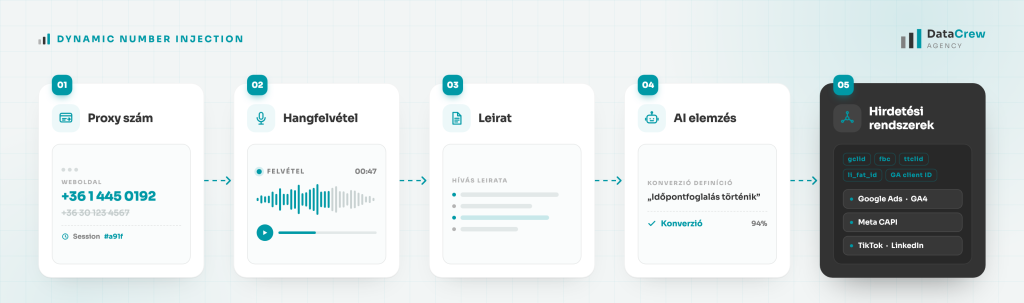
In the flow above, the completed call itself goes into your ad platforms as an offline conversion, which carries far more information than a phone number click event. And if the AI agent spots a conversion in the transcript, the closed deal goes in as a separate conversion. On top of that, Analytics receives considerably more data, which makes your calls much easier to analyze in detail.
Other call tracking features
There’s plenty of interesting data in a call beyond the conversion itself. With an appointment booking, for example, it’s worth capturing the appointment time, the treatment duration, the product purchased and so on. Phonevert can store these as custom dimensions and pass them to Google Analytics.
Sometimes you’ll want to track calls that don’t originate on your website. Phonevert has a dedicated number feature for exactly that. You get a fixed number that always forwards to the destination number you set in Phonevert, and it still runs through the whole pipeline: recording, AI analysis, the works. Use these numbers for offline placements. Print them on business cards, posters, T-shirts (😆).
You can also call customers back through Phonevert. Your agent gets a proxy number, and calling it from their own phone rings the customer. Handy for the times you couldn’t pick up.
We took a lot of steps to keep Phonevert’s call tracking GDPR compliant. Before the call connects, the caller hears a notice:
Please note that this call is being recorded by DataCrew Kft. for the purpose of preparing a quote, and will be retained for one year. Our privacy notice is available on our website. If you do not agree, please contact us directly on +36201234567. By staying on the line you consent to the recording.
Conversion tracking follows the Consent Mode v2 flags too. The conversion reaches your ad platforms (or doesn’t) with exactly the consent level the visitor granted on your site.
Recordings can only be played back inside Phonevert, and they’re end-to-end encrypted.
Form tracking
There’s no shortage of form tools out there. You can build forms inside Phonevert too. The app includes a form editor that makes it easy to put together good-looking forms like this one:
(no promises that I’ll actually call you back, this one’s here for the demo 🙂
You can receive form submissions by email, or push them into a CRM through a webhook. When somebody fills in the form, gets a callback and turns into a deal, one click marks the lead as converted and the deal lands in your ad platforms as an offline conversion.
Best part: if all you want is offline conversions from website forms, that’s available on the free Phonevert plan, with some limits.
Tracking deals that start over email
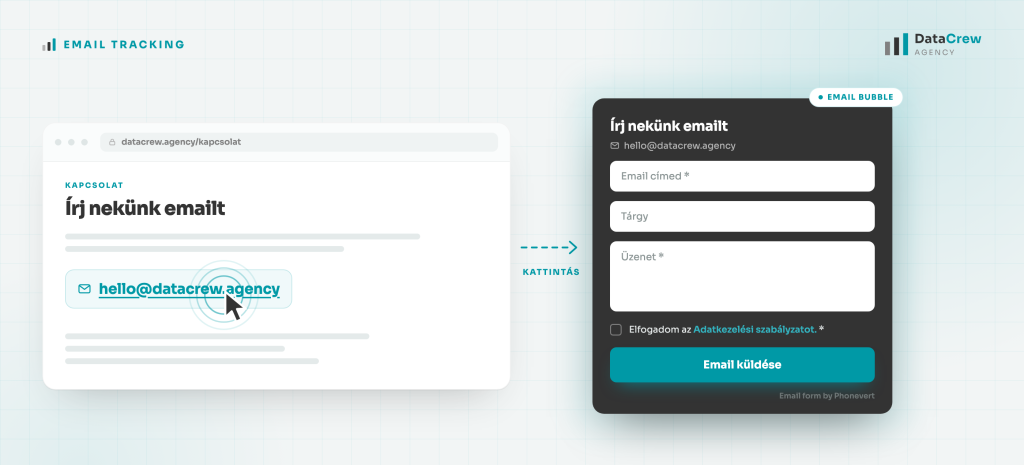
Phonevert can also make an email click open a mini form in a bubble instead of launching the visitor’s default mail client. It’s the same kind of form as the one above, so if an inquiry that starts here turns into a deal, that deal can go into your ad platforms as an offline conversion too.
Everything else
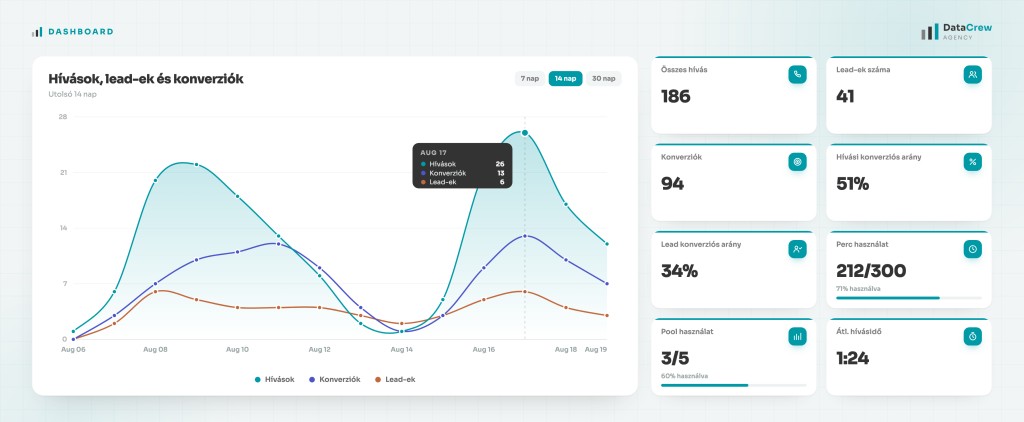
Phonevert can pass conversions to Google Ads, Google Analytics, Meta, LinkedIn and TikTok.
We could go on about Phonevert features for a while. There’s the unified, CRM-style customer handling, sGTM support, and the fact that it can work around Meta’s data sharing restrictions, so Phonevert is usable even on sites Meta has restricted, healthcare being the classic example. But none of that matters as much as the main point: with Phonevert, your ad platform can finally see the conversions that actually closed, and optimize toward those instead of the small stuff along the way.
To give you a nudge to try it, the coupon code DCBLOG20 gets you 20% off your first month. Worth a shot 😉
Agency clients can register a dedicated agency account. As an agency you can send invites to your own clients, and you earn 10% commission on every transaction those clients make. The details are on the agency page. Agencies can also log into the Phonevert account of any client they invited, so you can wire up the integrations yourself and see the install code you need.