


A few eyebrows went up when our last post laid out what we found auditing more than 36,000 sites running the Meta pixel. Time for a confession: pure curiosity wasn’t what drove us to check how often Meta blocks healthcare providers. What we really needed was a B2B prospect list: the companies worth advertising a workaround to.
A B2B prospect list like that works beautifully in LinkedIn Ads. You upload a CSV of companies, and the platform builds an audience out of the people who work at them. There’s huge potential here: B2B advertising is a tough game to begin with, but a list filtered on something real makes pinpoint targeting possible.
Is this even legal?
We never touch personal data, only publicly available company data. LinkedIn takes that company data and builds an audience from the people who work there, and we never see who ended up on it. So the process most likely doesn’t create legal headaches. Even so, bring in a privacy lawyer who is willing to put their name on it.
What does LinkedIn need for a good match?
LinkedIn tries to match the B2B prospect list you hand it against the companies on the platform. Then it puts the people working there into an audience you can advertise to. The B2B prospect list has to include, among other things, the company name, website domain, category, city, postal code, and country. The joker in the deck is the LinkedIn company URL: hand that over and there’s no question which company you’re targeting.
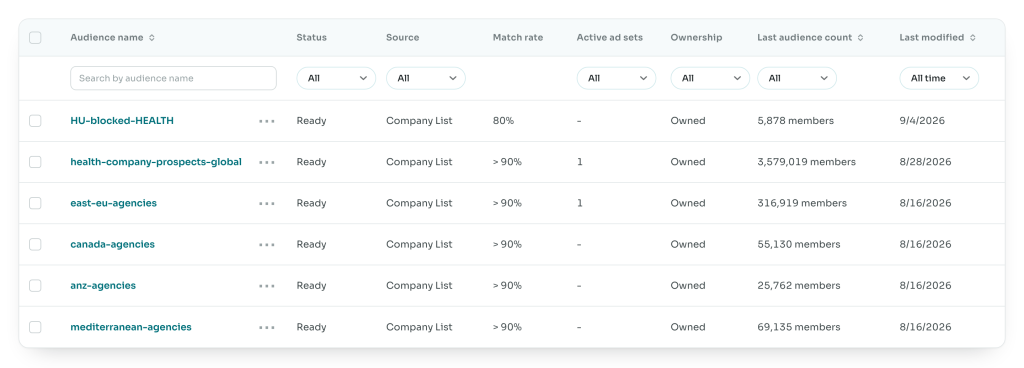
You can only upload a list if it holds at least 300 companies, and no more than 300,000. In Hungary, our home market, we identified exactly 300 blocked healthcare providers, so yes, we do have a Hungarian blocked-healthcare list too. 😉
After the upload, LinkedIn spends two to three days matching your data against its own companies. Wherever a company matches, the people who work there go into an audience you can start advertising to. At the end you get a match rate telling you how well it went. Anything above 80% counts as good, though we often end up with lists above 90%.
What about the other ad platforms?
Unfortunately this is limited to LinkedIn Ads. On the other big platforms you can only upload first-party user data, and to have any of that, the user has to explicitly consent to going on a list.
LinkedIn works completely differently: we’re not using personal data, we’re building a list out of publicly available information. Legal angles aside, the approach probably wouldn’t even be effective elsewhere. Google, Meta and the rest expect personal data, email addresses and phone numbers, and a pile of hello@ addresses scraped off websites is never going to hit a usable match rate. On top of that, the upload itself would break those platforms’ terms of service, so we don’t recommend using it that way.
How did our audit work?
Meta’s blocking is a technical thing. When the Meta pixel fires, it loads a config file. That config holds whether the site is under restriction and, if so, at what level. You can read a domain’s restriction level straight out of the config, as long as the pixel actually runs on it.
So all we need is a domain name to tell whether Meta is blocking it. It isn’t quite that simple, of course, because on plenty of sites the Meta pixel only fires after consent is accepted (exactly as it should). So auditing site after site through an automated process calls for a headless browser that
- Opens the domain
- Accepts the marketing cookies
- Checks whether a Meta pixel is there
- If it is, checks the Facebook pixel config for a restriction
- If there is one, collects every data point LinkedIn needs to identify the company, from structured data or wherever else it can find it
- And finally rolls all of that into a B2B prospect list we can upload to LinkedIn Ads
Detailed diagramSmaller diagram
We put the whole thing together with Claude Code, and Claude supervised the runs as well. The run took about a week. Claude didn’t eat many tokens over that stretch, because the machine ran the script Claude had written. Along the way Claude produced all sorts of statistics about the audit results, and reported in every few hours on where the process stood. So screening prospects like this won’t blow up your AI bill either.
But how did the headless browser know which sites to check?
From public databases. We used two of them, both completely free and nicely structured:
Really it came down to filtering for healthcare providers in a given country. The list that came back already carried some of what LinkedIn needs: company email address, city, postal code. But the most valuable field in these databases is the company’s website. As we showed above, a single URL is all we need to run the audit.
Once we have a company’s domain, we can walk it through the audit steps. No two websites are alike, though, so the headless browser might fail to get past the consent bar, or the site might carry no structured data at all. Then it has to go digging around the site itself, hunting for the Contact page, say, hoping the information we’re after is sitting there.
Those extra rounds are why the audit deserves a reasonably powerful machine with plenty of RAM. Keep an eye on how many sites the headless browser audits in parallel, too.
What is a B2B prospect list actually good for?
We used the process to find out one specific thing about a prospect’s website. The same process runs behind the Metamorph audit page, except there it happens in real time. So when we promote that audit page on LinkedIn to the audience we just built, it’s a safe bet. The people seeing the ad are ones we already know Meta is blocking, which makes the outcome of the on-site audit pretty much a given.
Auditing the websites isn’t mandatory either. You can also build a B2B prospect list straight off the databases above, seasoned with extra data collected from the sites. We’ve put together a global PPC agency list this way, purely from what the databases hold.
Limits
The process has its limits, of course. These databases only list companies with a physical store, headquarters, or site. Fully online businesses, like a lot of PPC agencies, aren’t in there, so they’re not on our B2B prospect list either. With healthcare providers that’s rarely a problem.
Results: how the B2B prospect list performed
So how did the list actually perform? We ran a Thought Leader Ad against that 300-company B2B prospect list of Meta-blocked Hungarian healthcare providers. For anyone less familiar with LinkedIn: that’s the ad format where an employee of the company (usually a leader) writes a post in their own LinkedIn feed, and the company then promotes it. So our Péter wrote a post, in Hungarian, linking to the blog post about Meta’s blocking.
We narrowed the identified healthcare companies further, down to those with 1 to 50 employees, to filter out the largest blocked companies. LinkedIn would also let us filter by seniority, but we skipped that this time.

The result was a 7.69% CTR, which for a plain image ad on LinkedIn is, in our view, a genuinely good number.