


Client or server?
Client-side tracking means the tracking code runs in the visitor’s browser and hands data off to an external analytics or advertising platform from there. Dropping an Analytics tag or an ad platform’s pixel onto your website is exactly this.
Server-side tracking, by contrast, brings a server you own or rent into the loop and sends the data on to the destination platforms (Analytics, Meta, TikTok and friends) from there. Which means a plain server log technically counts as server-side tracking, just as much as a lavishly built server-side Google Tag Manager setup does.
When do you need server-side tracking?
When you want to cut your ad spend
Cookies are in the crosshairs in modern browsers. Third-party cookies are already blocked outright by plenty of them (Safari and Firefox, for instance), and even first-party cookies get their lifetime cut short in certain cases. Server-side setups don’t necessarily use cookies at all, and sometimes they don’t even touch the visitor’s browser, which makes for far more reliable and accurate delivery to the ad platforms.
And ad platforms do their best work when they get plenty of data. They need to know how the people they send to your site actually behave there. When the system sees that one visitor segment converts much better than another, it goes looking for more people like that segment, and your conversion rate goes up. So the path to more conversions runs through more data, because that’s what lets the AI sharpen its ad delivery.
More data, then, lowers your cost per result and raises the number of conversions you actually measure. By how much? It depends heavily on your audience, but Meta reports a 13% drop in cost per result and 19% more measured conversions on a global average.
When you want more accurate data
If you spend time in Analytics, you’ve probably noticed the gap between users and new users getting smaller, and the share of direct traffic creeping up. Same root cause: some browsers are shortening cookie lifetimes. Analytics identifies your visitors with a first-party cookie that’s set to expire in a year by default, but Safari, for example, knocks that down to seven days.
Which means if your visitor comes back on day eight, they show up in your reports as a brand new user. And if that second visit doesn’t come from a campaign but does produce a conversion, the conversion lands under direct traffic, no matter what data retention setting you’ve got in Analytics.
A well-built server-side setup can get you all the way to 100% data accuracy. Picture running an online store and seeing exactly as many transactions and exactly as much revenue in Analytics as you see in your admin panel. That sounds like science fiction if client-side tracking is all you’ve known. It isn’t.
When you want a faster site
Server-side setups don’t just improve data accuracy, they’re good for site speed too. The reason is simple: you’re no longer loading a pile of external scripts. Instead you send requests to your own nearby server. That speeds up page loads, which is good news for your SEO as well.
When you want more control over the data you collect
Privacy is often the reason a server-side setup gets built in the first place. Your server can double as your own proxy, filtering data before it ever reaches your analytics platforms. We’ve had clients who wanted to see the value of every input field on the site in Analytics, for instance. Those fields can contain personal data, which you’re not allowed to send to Analytics. Your own server can strip that out.
We’ve also run into a legal team that would only sign off on Analytics for a site if the data carried no IP address, since they treated it as personal data. In that case you can build a setup where the IP goes to Analytics as 0.0.0.0. Our client had to give up IP-based geo data, but in exchange the legal team cleared Analytics to run without consent, which did wonders for campaign attribution.
Server-side tracking also opens the door to feeding profit figures into Analytics and your ad platforms. The idea is to use the profit realized on the products instead of the revenue. For an ecommerce site the revenue value is normally the total value of the purchase. Instead, you can pull the profit margin of the purchased products from a database and send that on to your destination platforms.
That makes your ROAS real. You’ll see exactly how much profit each campaign brought in. And since your margins are a trade secret, it matters that the competition can’t sniff them out. Server-side handles that: nothing about your profit figures is visible on the client side.
Off-site events
Everything above is a case where server-side tracking adds something on top of client-side. But there are things you simply cannot do without a server-side setup. Those are the events where your customer isn’t on your website at all, and you still want to measure something about them.
Subscription models with recurring payments keep getting more common. When the card gets charged, the visitor isn’t on your site, so there’s no client-side code to run. Server-side lets you push that revenue into your platforms at the moment the charge goes through, attributed to the right campaign and source, exactly as if the visitor were right there. Their measured lifetime value can grow whether or not they’re on your site.
Refunds are another case for server-side. If you want your numbers to be honest, revenue isn’t enough, you have to handle cancellations too. Those rarely happen while the customer is browsing your site, and server-side deals with them without breaking a sweat.
Think about what that lets you automate: an online store voiding an order the courier delivered but the customer never picked up. Or a bank transfer that never arrives by the deadline. Getting cancellations into the data is fundamental if you want a realistic ROAS and realistic revenue in your analytics.
Server-side is a powerhouse for lead gen sites too. If all a visitor can do on your site is fill in a form, and the actual deal closes offline, you still don’t have to give up revenue values. It gets really good when you pipe every meaningful lead milestone from your CRM into Analytics, so you can see the campaign source of every lead at every status, with a value attached. Compare that to treating a form submission as your conversion. It’s night and day.
Fine, but is this legal?
Of course. Server-side tracking isn’t about measuring whatever you like without the visitor’s consent. It’s about actually having the data when they do consent. You aren’t measuring anything different server-side than you would client-side, you’re just measuring it differently.
Server-side tracking isn’t a black-hat tool. It just helps you get the most accurate version of the data you’re already entitled to.
How do you roll it out?
So there are plenty of situations where server-side tracking is useful, or flat-out required, if you want data you can work with. Time to talk about how you actually build it.
A lot of very different setups go by the name „server-side tracking”. It’s server-side tracking when your hosted store platform supports Meta’s Conversions API (CAPI) out of the box, and it’s also server-side tracking when a request fired from your backend delivers data to Analytics’ servers. With that many ways to build it, the price and the accuracy vary just as widely.
Given all those options, the job is finding the setup that fits your environment and satisfies your appetite for data. Not every setup can be adapted to every stack. So rather than getting lost in the maze, it may be worth bringing us in to handle the rollout.
Your options for building server-side tracking
Once you’ve decided to go server-side, you have several routes.
sGTM
The most common option is server-side Tag Manager. The upside is the same as with client-side Tag Manager: one data source can feed several destination platforms.
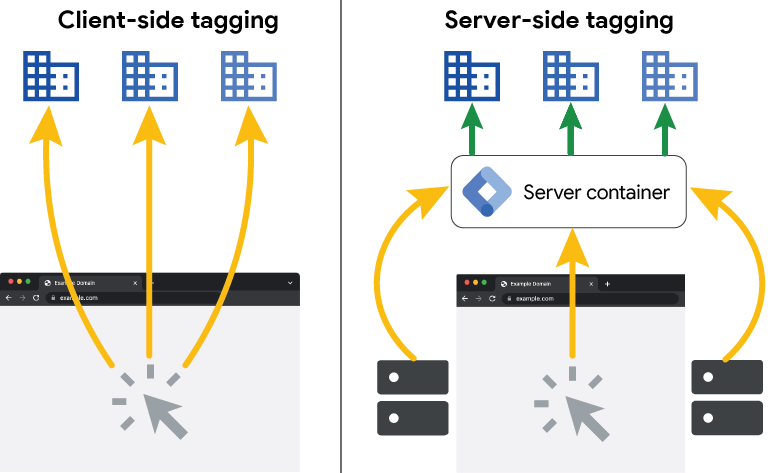
What you’ll need for an sGTM rollout:
- A server you own or rent
- GTM
- Changes to your domain records
A server you own or rent
Your sGTM can run on a dedicated server you own or one you rent. Clients often figure that since they already run their own servers, they’ll host the sGTM server themselves too. In practice that rarely happens. Self-hosting usually works out considerably more expensive than renting. And it isn’t just the build cost: running the server, maintaining it and the staffing that comes with it are all recurring.
It doesn’t help that Google shares very little about manual server setup, to the point that there aren’t even published minimum system requirements.
In practice we host sGTM containers on rented infrastructure every time. Google Cloud is one option, and so are providers that specialize in exactly this. We usually recommend Stape.io. Their pricing is clear, predictable and cheaper than the Google Cloud route. On a low-traffic site sGTM hosting can even be free, and at moderate traffic it won’t run you more than €50 a month. You can work out the exact number with the calculator on their site.
GTM
Before you roll out sGTM you’ll need GTM, assuming your tracking was built with native code up to now. Here’s why: the client-side GTM sends the data into the server-side GTM, and it travels on to the destination platforms from there. So you need the client-side container too.
Changes to your domain records
To make your sGTM as resistant as possible to ad blockers, the container should live under your own URL. So if your site is example.com, the sGTM container can run at server.example.com, which means requests land on your own hostname. You create a subdomain like that by editing your DNS records.
Better still is putting sGTM on a page path under your existing hostname, say example.com/server. In that case a service worker on /server forwards the request on to server.example.com.
Picking the right subdomain matters. Steer clear of names that give the game away, like gtm.example.com or tracking.example.com, or the name alone will trigger an ad blocker and all your work goes out the window.
Pros and cons
An sGTM rollout takes minimal developer time and buys you a lot of credibility with the ad platforms. You can build server-side tracking toward a long list of destinations with it. Meta, TikTok and X CAPI become available, and data can flow server-side into Google Ads, Analytics and plenty of other platforms.
The downside is that client-side code still kicks off the handoff, so there’s no 100% guarantee that something won’t block it along the way. It also carries a recurring cost. Not a big one, but you have to budget for it.
Backend tracking
You can also send events straight from your backend to the destination platforms’ servers, with no server-side GTM in the picture. The advantage is that the visitor’s browser plays no part in the handoff, so 100% data accuracy is on the table. It’s also a one-time build cost with nothing recurring.
The downside is that it’s rigid. Without GTM in the middle, every change means calling a developer again. And you have to build the tracking separately for every destination. If you want Meta and TikTok CAPI alongside Analytics, that’s three integrations and three development projects.
Since your backend is what sends the data, the events arrive carrying your server’s location. If you need accurate geo data, this isn’t the setup for you.
Backend tracking still needs code running client-side, too. If something blocks that client-side code, your backend events will still reach the destination platforms, but they’ll be useless for campaign attribution. In practice that means the conversion shows up in Analytics with a source of (not set), and Meta won’t attribute it to a campaign at all.
The hybrid
You can roll out server-side GTM and still send your key conversions from the backend. This combines the strengths of both: sGTM sharpens the accuracy of your client-side tracking, while the events you treat as real KPIs arrive from the backend, so 100% accuracy is achievable. As a bonus, you only build one integration on the backend and it can feed every destination.
This is the genuinely advanced option, and it’s what most of our clients end up choosing.
Gateways
The simplest and cheapest way into server-side tracking is a gateway. Each gateway forwards data to exactly one destination, so you’ll need as many gateways as you have platforms. The upside is the price: a gateway runs about €10 a month at stape.io, our preferred provider.
For that money you get a fairly generous event cap, enough to cover a mid-to-high traffic site. Accuracy matches sGTM, which means the handoff can in theory be blocked, since this isn’t backend tracking.
Setting up a gateway is very simple. With the right access in hand it’s a few minutes of work.
If you need more than one or two destinations, it’s worth thinking about sGTM instead. Depending on your traffic it can come out cheaper, and it’s a far more flexible ecosystem.
On our own site we run Google Tag Gateway, because we don’t need any other destination, we just want accurate numbers on our own traffic.
Gateways come with the same geo caveat: you’ll be waving goodbye to precise location data. Analytics shows you the server’s location, which for European visitors usually means whichever nearby data center the provider runs. If geo data matters to you, we’d steer you away from gateways for the same reason we steer you away from pure backend tracking.
The bottom line
Rolling out server-side tracking is a broad term that can mean a lot of things. It can mean a gateway for a few euros a month, or a development project running into the thousands. What matters is that even a cheap solution, implemented properly, moves you a long way forward on data accuracy and attribution. There’s always room to do better, of course, so if accuracy is critical, there’s no ceiling on how good a setup you can build.
In 2025 server-side tracking is essentially unavoidable, even in segments that used to get by on client-side alone. But execution matters just as much:
- Work with what your site already gives you;
- Be clear about the measurement goal;
- Be honest about the resources you have
Build it badly and you won’t have more data than before, you’ll just have an extra line item. That’s why, if you’re about to take on a server-side project, we’d suggest you ask us for a quote and let us help.
We were the first agency in Hungary to earn Stape partner status, and there still aren’t many of us. When it’s needed, we can back our clients with priority support and a lot of hard-won experience.